---
title: Create a read-only Apex account
description: Set up a free read-only account with Apex to view your Frec holdings and activity directly. Follow these steps using your Frec account number.
---
[Skip to content](https://help.frec.com/en-us/create-a-read-only-apex-account#main-content)
[](https://help.frec.com/en-us?hsLang=en-us)
- [Contact help](https://help.frec.com/contact-help)
- [Login](https://frec.com/app/login)
Open main navigation
Close main navigation
- [Contact help](https://help.frec.com/contact-help)
- [Login](https://frec.com/app/login)
This is a search field with an auto-suggest feature attached.
- There are no suggestions because the search field is empty.
1. [Frec Help Center](https://help.frec.com/en-us?hsLang=en-us)
2. [Account & security](https://help.frec.com/en-us/account-security?hsLang=en-us)
3. [Connected apps & access](https://help.frec.com/en-us/account-security?hsLang=en-us#connected-apps-access)
September 19, 2026
# Create a read-only Apex account
You will not be able to trade in this account, but you will be able to see your positions and activity. You can follow these steps to create a read-only account on Apex:
1\. Go to [Apex’s website](https://public-apps.apexclearing.com/session/?_ga=2.150877494.1074931506.1698088969-725538321.1697723181&_gl=1*gnrkkp*_ga*NzI1NTM4MzIxLjE2OTc3MjMxODE.*_ga_RCCP8DVNYL*MTY5ODA4ODk2OS4yLjAuMTY5ODA4ODk2OS42MC4wLjA.#/login/)
2\. Click on **Create User ID** below the blue Next button
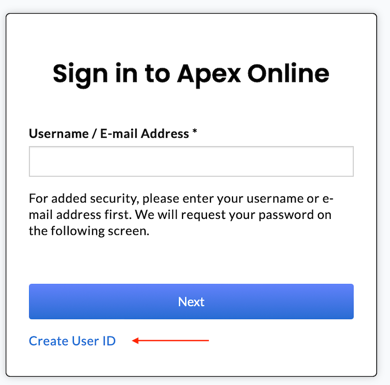
3\. Get your account number from Frec. To do this click on your name in the top right \> **Account settings** \> **Account**. Your account number should be listed under **Frec account**, 8 digits long, consisting of both letters and numbers, and starting with a 3.
4\. Enter your SSN, e-mail address, and security question as prompted.
5\. Create your username and password.
Please [contact us](https://ryjz0.share.hsforms.com/2y90uvW7USD2ZKJ1kQCQYNg) if you have any questions during the process.
[](https://frec.com/)
FREC © 2026 Frec Markets, Inc. All rights reserved.